
Builder Model 1005 Thermostat
(discontinued)
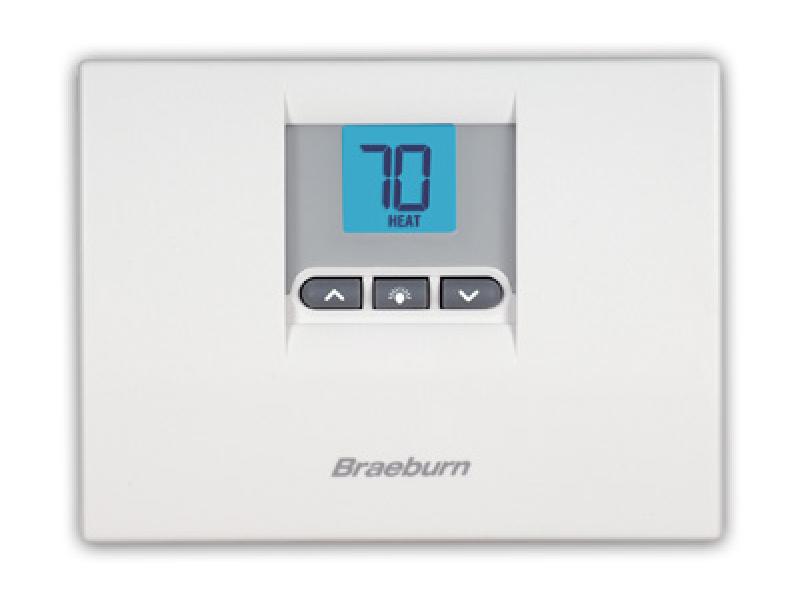

Model
1005
Series
Builder
Description
Non-Programmable Thermostat
Compatibility
Conventional
Staging
Heat, Cool Only
Display Size
0.8 Sq. In.
Power
Battery
Terminations
R, W/Y, G
Commercial Mode
No
Backlight
Bright Blue
Keypad Lockout
No
Auto Changeover
No
Adj. Temp. Limits
No
Remote Sensors
No
Programmable Fan
No
Humidity Control
No
Fresh Air Terminal
No
Warranty
5 Year

Sorry, this product has no FAQs.
Does my thermostat require batteries?
Some Braeburn thermostats require 2 "AA" alkaline batteries while many newer models can be battery operated, directly wired (hardwired) or both. Check your user manual for specific instructions.
HI is shown in the display where the temperature is normally displayed.
The temperature sensed by the thermostat is higher than the 99 F (37 C) upper limit of the thermostats display range. The display will return to normal after the sensed temperature lowers within the 40 to 99 F (4 to 37 C) display range. Turn on the cooling system or use other methods to lower the temperature. This condition could occur from the system being turned off during an exceptionally warm period or upon installation when the thermostat has been stored for a long period of time in a warm vehicle or location prior to being installed.
How do I adjust the temperature differential setting?
Press and hold both the UP and DOWN arrow buttons together for a few seconds. The screen will change and your temperature differential setting will appear in the display. Use the UP or DOWN arrow button to adjust this setting to your desired value. Wait a few moments and the screen will return to normal.
How do I get into the USER SETTINGS mode?
To enter the USER SETTINGS mode where you can adjust settings such as your temperature differential, press and hold both arrow buttons for 4 seconds. The display will then switch to the USER SETTINGS mode. Briefly press both arrow buttons together to cycle through each of the different user options and the UP or DOWN arrow buttons to cycle through selections for each particular user option. After a few moments of inactivity the display will return back to normal mode.
LO is shown in the display where the temperature is normally displayed.
The temperature sensed by the thermostat is lower than the 40 F (4 C) lower limit of the thermostats display range. The display will return to normal after the sensed temperature raises to within the 40 to 99 F (4 to 37 C) display range. Turn on the heating system or use other methods to raise the temperature. This condition could occur from the system being turned off during a cold weather period or upon installation when the thermostat has been stored for a long period of time in a cold vehicle or location prior to being installed.
My heating or cooling system will not turn on at all.
Put the thermostat into the OFF mode. Remove the batteries (if equipped) and press the reset button located on the front of the thermostat. Replace the batteries and move the system switch to the HEAT or COOL position and try running your heating or cooling system again. If the problem persists then you may have a problem with your heating system that is causing it to not operate properly. You may need to call your installer or a local service contractor in your area.
My heating system (furnace) functions intermittently or doesn't always reach my set point temperature before turning off.
Put the thermostat in the OFF mode. Remove the batteries (if equipped) and press the reset button located on the front of the thermostat. Replace the batteries and move the system switch to the HEAT position and then try running your heating system (furnace) again. If the problem persists then you may have a problem with your heating system (furnace) that is causing it to run intermittently or turn off prematurely. You may need to call your installer or a local service contractor in your area.
My system cycles too often or not often enough.
Your thermostat is equipped with an adjustable temperature differential setting which will determine how much your system cycles. The lower the differential setting, the more your system will cycle and the tighter the temperature will remain. If your system cycles too often, raise your differential setting to a higher degree.
The display is flashing the word HEAT or COOL but no air is coming out of the vents or the air is not the right temperature.
When the word HEAT or COOL flashes it indicates that the thermostat is telling the heating or cooling system to run. If the heating or cooling system is not running then there most likely is a problem within the system. Contact a local heating / air conditioning contractor in your area to service your equipment.
The display is flashing the word HEAT or COOL.
Most newer Braeburn thermostat models will flash the word HEAT or COOL when the thermostat is calling for your heating or cooling system to run. When the call for heating or cooling is over, the word HEAT or COOL will become solid. Please note that some older Braeburn models do not flash the HEAT or COOL icon when the system is running.
What is the temperature differential setting?
Your thermostat is equipped with an adjustable temperature differential setting which will determine how much your system cycles. The lower the differential setting, the more your system will cycle and the tighter the temperature will remain. If your system cycles too often, raise your differential setting to a higher degree.
What type of battery should I use for my thermostat?
If your thermostat requires batteries, use only type "AA" alkaline batteries. Make sure to install the positive (+) and negative (-) ends of the batteries correctly as shown inside the battery compartment.
When I turn on my gas furnace cool air blows out of the vents for the first couple of minutes.
Your thermostat may be configured for an electric furnace. When configured for an electric furnace the fan comes on immediately when there is a call for heat. Gas furnaces need a couple minutes of warm up time before the fan runs. Please see the "installation" section of your owner's manual for information on how to properly set your gas/electric fan option. All manuals are available on this website.
When I turn on my heating system (furnace) it takes a couple minutes for any heat to come out of the vents.
Most gas furnaces have a short warm up period before the fan will come on and circulate the warm air throughout your ductwork. This is to prevent cool air from blowing at initial startup and is not controlled by the thermostat.
When should I change my batteries?
If your thermostat requires batteries, you need to change them when the battery icon appears in the display. This indicates that the batteries are becoming low and should be changed as soon as possible. Always change batteries when you will be away for a long period of time.
Related Accessories
-
 2950
2950 -
 5970
5970
Product specifications may change without notice.